MapReduce: Explained Simply as The Story of Sam
Couple of days back I made a presentation I made to explain the concept of MapReduce simply. I have attached the slides here for anyone interested. Please note, this doesn't include animations. If you want to get a better feeling feel free to download the original version of this MapReduce presentation.
MapReduce in Simple Terms
View more presentations from esaliya.
Command Line: Relaxing Colors
I have been using a color theme for the command line in both Windows and Ubuntu for sometime now and it has been really comfortable for the eyes. So if you feel tired or bored using the white on black try these.
Background Color: #3A4237 (in RGB this is 58,66,55)
Text Color: White
It will give you this feeling of a good old chalk board. Here's a screen capture of how it looks.

Background Color: #3A4237 (in RGB this is 58,66,55)
Text Color: White
It will give you this feeling of a good old chalk board. Here's a screen capture of how it looks.

Sinhala Poems by My Wife
My wife, Kalani, has started a blog to post her Sinhala poems. It's nice to see her archive of poems are finally coming up online.
I am waiting to see the poem written for me :D
I am waiting to see the poem written for me :D
Synergy: Share Keyboard and Mouse
I wanted to use two computers running separate OSs, yet use the same keyboard and mouse. After searching a bit I found Synergy (http://synergy2.sourceforge.net/index.html). I should say it's one of the most easy-to-use software I have ever encountered. Here are the quick steps (you can read more on their user's guide).
1. Install Synergy on both machines.
2. Setup one machine as the server.
3. Add the machines left, right, top, and bottom of the server (if any).
4. Start synergy as client on those other machines.
That's it and it's working. Only thing is that all machines should be in the same network.
One cool thing is that clipboards of all machines are shared. So copy from one machine and paste in the other is possible. Also it enables you to activate screen saver on all machines at once.
1. Install Synergy on both machines.
2. Setup one machine as the server.
3. Add the machines left, right, top, and bottom of the server (if any).
4. Start synergy as client on those other machines.
That's it and it's working. Only thing is that all machines should be in the same network.
One cool thing is that clipboards of all machines are shared. So copy from one machine and paste in the other is possible. Also it enables you to activate screen saver on all machines at once.
Split View in Firefox
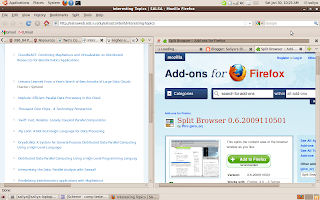
After being able to split the Eclipse windows, I felt the need to split Firefox. Luckily I came across this add-on called "Split Browser", which simply does this for you. It enables you to split tabs both horizontally and vertically. Here's a screenshot of this.

Split View in Eclipse
I really wanted the split view feature to be in Eclipse as with most of the other IDEs. In fact, Eclipse has this feature, but doesn't give a visible menu/tool option to do it. The simplest way is to drag the tab containing the source until you can see an arrow mark. Then it will split the view as soon as you let go of the mouse. Here's a nice video I found on how to do this.
http://addisu.taddese.com/blog/split-windowview-using-eclipse/
Here's a screenshot of how it looks.

http://addisu.taddese.com/blog/split-windowview-using-eclipse/
Here's a screenshot of how it looks.

FireFox Keyboard Shortcuts
Great! Now I can stop using mouse for the most part of browsing.
http://support.mozilla.com/en-US/kb/Keyboard+shortcuts
http://support.mozilla.com/en-US/kb/Keyboard+shortcuts
Internet Speed: Isn't this nice?
In Sri Lanka, I used to connect to Internet using dial-up connection before ADSL came in. Then I felt "wow! ADSL is fast". But today here in IU, I would say "WOW! what a speed". See the picture below to see why I say this.


Windows7: Desktop Icons: CTRL + Wheel
I wanted to change the size of the icons in Windows7 desktop as they were bit larger than I like. The solution was a simple one, though I had to do some Googling to find it out.
Just scroll the mouse wheel while pressing CTRL key. That's easy :). In fact, it can be used in many other places like in windows explorer to change the way how items are showed.
Windows7 and Ubuntu 9.10
I just wiped out my Dell Insipiron E1505 notebook and installed Windows7 Professional and Ubuntu 9.10. I had enough of the Windows XP Media Center Edition. I thought of moving to Ubuntu 9.10 as well, just feel the fun.
Unlike in the previous experience with Windows, the Windows 7 performs really well. Regarding Ubuntu, it's better than 9.04 (I was happy with 9.04 as well). The only funny thing is that I had to find drivers and manually install my ATI Raedon X1300 VGA for Windows7. Earlier I used to do this for Ubuntu installations :)
For the moment, these two OSs seems to be a great combination if you are planning to get the best of both worlds.
Unlike in the previous experience with Windows, the Windows 7 performs really well. Regarding Ubuntu, it's better than 9.04 (I was happy with 9.04 as well). The only funny thing is that I had to find drivers and manually install my ATI Raedon X1300 VGA for Windows7. Earlier I used to do this for Ubuntu installations :)
For the moment, these two OSs seems to be a great combination if you are planning to get the best of both worlds.
Pidgin: Unable to Connect to Yahoo
Pidgin was giving trouble when connecting to my Yahoo account since recently. Today I got to know that it's because of this (http://www.celticwolf.com/useful-information/faqs/26-pidgin-yahoo).
Then I wanted to install a latest version of pidgin on my Ubuntu 9.04. I tried the "how to" given in the official pidgin site (http://www.pidgin.im/download/ubuntu/), but it was unsuccessful. Then I came across these debs (http://linux.softpedia.com/progDownload/Pidgin-Download-6.html) which solved the issue.
Just a quick how-to:
1. Download the i386 (or amd 64) debs
2. Download the two DEB ALL debs
3. Use dpkg -i to install the debs. Start with libpurple-bin_2.6.3-1~getdeb1_all.deb.
Then libpurple0_2.6.3-1~getdeb1_i386.deb (or amd 64 one).
Now move ahead with pidgin-data_2.6.3-1~getdeb1_all.deb.
Next pidgin_2.6.3-1~getdeb1_i386.deb (or amd 64 one)
That's it! no more troubles with Yahoo ;)
Then I wanted to install a latest version of pidgin on my Ubuntu 9.04. I tried the "how to" given in the official pidgin site (http://www.pidgin.im/download/ubuntu/), but it was unsuccessful. Then I came across these debs (http://linux.softpedia.com/progDownload/Pidgin-Download-6.html) which solved the issue.
Just a quick how-to:
1. Download the i386 (or amd 64) debs
2. Download the two DEB ALL debs
3. Use dpkg -i to install the debs. Start with libpurple-bin_2.6.3-1~getdeb1_all.deb.
Then libpurple0_2.6.3-1~getdeb1_i386.deb (or amd 64 one).
Now move ahead with pidgin-data_2.6.3-1~getdeb1_all.deb.
Next pidgin_2.6.3-1~getdeb1_i386.deb (or amd 64 one)
That's it! no more troubles with Yahoo ;)
Design Defect: Dell E1505
See what has happened to the paint and you can understand the defect. Dell, you really need to think more on the paint material :)


Functional Vs Relational
After sweating my brain over functional programming in Prof. Daniel Friedman's class over the past several weeks, I got the chance to play with relational programming with miniKanren.
It took me some time to adjust my brain to accept the difference. Finally, I told myself
"Going to the grocer and paying for what you got is functional programming, but going to the grocer and handing over 10$ asking to give whatever that fits is logic programming"
Just a thought :)
It took me some time to adjust my brain to accept the difference. Finally, I told myself
"Going to the grocer and paying for what you got is functional programming, but going to the grocer and handing over 10$ asking to give whatever that fits is logic programming"
Just a thought :)
Identify Ports: Weird Holes in Your Laptop
Ever wondered what is the purpose of a weird shape hole in your laptop? I did and luckily I found this nice site (http://techplore.com/technology/know-your-connectors-ports-a-visual-guide/) with all the info I needed.
Internet Explorer 8: Replacement for Chrome
After installing Windows7 on my machine, I went on installing my usual set of software including Google Chrome. But, I wanted to test InternetExplorer 8, which is the default browser, as well. So why wait, I started using it. Wow! I have to admit that it's cooler than Chrome. Why I say this mostly because it has a nice set of customizable accelartors. Also so far it is reliable than Chrome in Windows7. Moreover, it's way better than IE 7, which I consider as a pretty bad version of IE.
Jython Web Service Framework
My friend, Heshan, has done an interesting work to provide a framework extension to Axis2 which enables Jython based Web services and clients. Read more on his article (http://www.ibm.com/developerworks/web/library/wa-jython/)
axis2
,
friends
,
jython
,
webservice
Record Scheme Sessions: Transcript
Ever wanted to save what you type in your Scheme interpreter? I wanted :). So after a small Google search I found these nice two commands.
To start recording type,
(transcript-on "filename")
To end recording type,
(transcript off)
That's it. Now your session is saved in the file given by you.
Running Matlab Remotely: ssh -X
I wanted to run Matlab by logging into the university account remotely from my machine. Everything went fine except for the graphics. Matlab started in no graphics mode.
After bit of a search I found the solution. You have to set the X11 forwarding in you ssh configuration file. Here's how to do it.
1. cd /etc/ssh
2. sudo vi ssh_config
3. uncomment the lines "ForwardAgent" and "ForwardX11". Set their values to "yes"
4. sudo vi sshd_config
5. uncomment "X11Forwarding" and set it value to "yes" as well.
that's it and you are good to go.
Type ssh -X username@domain
To test if everything works fine try running xclock once you log in. It should open up a graphical clock window.
After bit of a search I found the solution. You have to set the X11 forwarding in you ssh configuration file. Here's how to do it.
1. cd /etc/ssh
2. sudo vi ssh_config
3. uncomment the lines "ForwardAgent" and "ForwardX11". Set their values to "yes"
4. sudo vi sshd_config
5. uncomment "X11Forwarding" and set it value to "yes" as well.
that's it and you are good to go.
Type ssh -X username@domain
To test if everything works fine try running xclock once you log in. It should open up a graphical clock window.
Subscribe to:
Posts
(
Atom
)


