Copy Path to Clipboard : Another Life Saver
Want to copy the path of a file to clipboard in Windows without having to open properties window? Just try Copy Path to Clipboard v 1.00 (http://www.softpedia.com/get/System/OS-Enhancements/Copy-Path-To-Clipboard-JA.shtml). It's a pretty neat tool that saves quite a bit of human I/O time :D
Note. It works fine with Windows 7 as well.
Note. It works fine with Windows 7 as well.
ReSharper: Life Saver for Visual Studio Users
If you are using Visual Studio for application development then most probably you may have noticed the lack of built-in refactoring support. At least for me it was so obvious, probably because I was used to the rich environment provided by IntelliJIDEA (http://www.jetbrains.com/idea/) for Java development. So finally did some search to see if there's any third party plug-in for Visual Studio on this aspect and guess what! The same guys who build IntelliJIDEA has a plug-in called ReSharper (http://www.jetbrains.com/resharper/). I had no second thoughts to use it based on my experience and it sure changed my clumsy feeling towards Visual Studio :)
Unfortunately it's not free, but if you are doing open source development they give you it for free. Anyway, the cost isn't sky-high to purchase as well.
Unfortunately it's not free, but if you are doing open source development they give you it for free. Anyway, the cost isn't sky-high to purchase as well.
C#
,
intellij
,
resharper
,
tutorial
,
visual studio
It's Cold Again
අඳුරු වළා ලං වුනා ද
එලිය නුඹේ නැති වුනා ද
සීත අහසෙ රජ වුනා ද
නුඹ ආයෙත් සැඟ වුනා ද
2/22/11
(C) Saliya Ekanayake
එලිය නුඹේ නැති වුනා ද
සීත අහසෙ රජ වුනා ද
නුඹ ආයෙත් සැඟ වුනා ද
2/22/11
(C) Saliya Ekanayake
Subscript and Superscript with MS Word 2007 Equations
If you happen to use MS Word 2007 for equations and wonders why the heck there isn't a shortcut to subscript and superscript then you will like what I just found couple of minutes ago.
If you want to type e1 with 1 as subscript just type e_1. The moment you hit space it will become what you want. To make 1 superscript type e^1 and space. Enjoy!
If you want to type e1 with 1 as subscript just type e_1. The moment you hit space it will become what you want. To make 1 superscript type e^1 and space. Enjoy!
equations
,
subscript
,
superscript
,
tutorial
,
word 2007
Open Cubicles and Work
I wanted to blog about this for a long time and finally it's out today. If you are in the computer science world working in some company or doing research, cubicles will not be a new thing for you. A large room partitioned into blocks of small cubicles and two or more people working nearby are the typical nature of these work areas.
Honestly, I really really don't like this setting. I wonder who came up with this idea of having people sit nearby in the open and work. May be people are thinking that having open cubicles give more freedom to people because they are not physically constrained by walls or doors. But have they ever thought the effect on mind? Does physical boundaries affect the same way to mind? In fact, I think it's totally the other way around. You cannot think effectively when you are in open with others. Essentially what happens is that you are physically free, but mentally constrained.
The truth with everyone, no matter how much they don't like to show it, is that they have unique ways of working optimally. This may include things like clapping and rubbing the hands when your code works and say "Oh! Sh*t" when it doesn't. Not to mention the luxury of thinking silently. How much of these can you do when you are in a professional setting surrounded by others? Also, how much actions of others can you tolerate. Here's one of my personal experience. A person who sat next to me used to sip his coffee so loud and end each sip with the sound "aah". I understand that it's how he likes to enjoy his coffee. That's perfectly fine, but for me that sipping was annoying and disturbing.
So in my view, if you want to work effectively specially when you have to think, open cubicles are nothing but jail to your mind. If you think I am crazy, think of theses (http://www.guardian.co.uk/books/2009/sep/19/books-written-in-prison). These guys were in prison physically, but they had all the "space" in mind to think. No I am not suggesting to go to prison to work :D.
Anyway, another good video on "Why work doesn't happen at work", by Jason Fried from one the TED talks can be found from here (http://www.ted.com/talks/jason_fried_why_work_doesn_t_happen_at_work.html).
Honestly, I really really don't like this setting. I wonder who came up with this idea of having people sit nearby in the open and work. May be people are thinking that having open cubicles give more freedom to people because they are not physically constrained by walls or doors. But have they ever thought the effect on mind? Does physical boundaries affect the same way to mind? In fact, I think it's totally the other way around. You cannot think effectively when you are in open with others. Essentially what happens is that you are physically free, but mentally constrained.
The truth with everyone, no matter how much they don't like to show it, is that they have unique ways of working optimally. This may include things like clapping and rubbing the hands when your code works and say "Oh! Sh*t" when it doesn't. Not to mention the luxury of thinking silently. How much of these can you do when you are in a professional setting surrounded by others? Also, how much actions of others can you tolerate. Here's one of my personal experience. A person who sat next to me used to sip his coffee so loud and end each sip with the sound "aah". I understand that it's how he likes to enjoy his coffee. That's perfectly fine, but for me that sipping was annoying and disturbing.
So in my view, if you want to work effectively specially when you have to think, open cubicles are nothing but jail to your mind. If you think I am crazy, think of theses (http://www.guardian.co.uk/books/2009/sep/19/books-written-in-prison). These guys were in prison physically, but they had all the "space" in mind to think. No I am not suggesting to go to prison to work :D.
Anyway, another good video on "Why work doesn't happen at work", by Jason Fried from one the TED talks can be found from here (http://www.ted.com/talks/jason_fried_why_work_doesn_t_happen_at_work.html).
Great Feedback: MapReduce In Simple Terms
My presentation on MapReduce has received some great feedback via Pragmatic Integration. Isn't it really nice to see how somebody who you don't even know benefits from something you have?
WCF Hosting with IIS7
I started working with services in Windows world recently and got stuck pretty badly when I tried to host a WCF service in IIS 7. I was receiving errors no matter what solution I tried with Googling. All of them mentioned that I may not have installed ASP.NET properly, but I have installed it properly.
So I was clueless for a while, but luckily found this great article in WCF Tools team's blog, which mentioned that it may be because I installed Visual Studio prior to installing IIS. I did the simple command mentioned there and wow! it worked.
I will post a step-by-step guide in a later post on how to deploy your WCF Service in IIS7.
So I was clueless for a while, but luckily found this great article in WCF Tools team's blog, which mentioned that it may be because I installed Visual Studio prior to installing IIS. I did the simple command mentioned there and wow! it worked.
I will post a step-by-step guide in a later post on how to deploy your WCF Service in IIS7.
Hadoop: Writing Byte Output
Recently, I wanted to write the set of value bytes (only them; no key) from the Reduce task of a Hadoop MapReduce program. The signature of the reduce function looked like this.
In the main method I used SequenceFileOutputFormat as the output format. But it turned out that this way I get output as a SequenceFile, which I cannot later read by a separate Java program to extract out the values. May be I am wrong here, but as far as my searching went on, I couldn't find a way to easily do this.
After being fed up with searching I thought of writing a custom FileOutputFormat just to suit my job. So I wrote this ByteOutputFormat class, which simply writes the value bytes as a binary file. So later I can read it using a normal (non Hadoop aware) Java program to extract the bytes.
Hope this would be helpful for you as well.
public void reduce(Text text, Iterator<byteswritable> itr, OutputCollector<text,> output, Reporter reporter)
In the main method I used SequenceFileOutputFormat as the output format. But it turned out that this way I get output as a SequenceFile, which I cannot later read by a separate Java program to extract out the values. May be I am wrong here, but as far as my searching went on, I couldn't find a way to easily do this.
After being fed up with searching I thought of writing a custom FileOutputFormat just to suit my job. So I wrote this ByteOutputFormat class, which simply writes the value bytes as a binary file. So later I can read it using a normal (non Hadoop aware) Java program to extract the bytes.
import org.apache.hadoop.fs.FSDataOutputStream;
import org.apache.hadoop.fs.FileSystem;
import org.apache.hadoop.fs.Path;
import org.apache.hadoop.io.BytesWritable;
import org.apache.hadoop.io.NullWritable;
import org.apache.hadoop.io.compress.CompressionCodec;
import org.apache.hadoop.io.compress.DefaultCodec;
import org.apache.hadoop.mapred.FileOutputFormat;
import org.apache.hadoop.mapred.JobConf;
import org.apache.hadoop.mapred.RecordWriter;
import org.apache.hadoop.mapred.Reporter;
import org.apache.hadoop.util.Progressable;
import org.apache.hadoop.util.ReflectionUtils;

import java.io.DataOutputStream;
import java.io.IOException;

/**
 * @author Saliya Ekanayake
 */
public class ByteOutputFormat<K, V> extends FileOutputFormat {
    protected static class ByteRecordWriter<K, V> implements RecordWriter<K, V> {
        private DataOutputStream out;

        public ByteRecordWriter(DataOutputStream out) {
            this.out = out;
        }

        public void write(K key, V value) throws IOException {
            boolean nullValue = value == null || value instanceof NullWritable;
            if (!nullValue) {
                BytesWritable bw = (BytesWritable) value;
                out.write(bw.get(), 0, bw.getSize());
            }
        }

        public synchronized void close(Reporter reporter) throws IOException {
            out.close();
        }
    }

    @Override
    public RecordWriter<K, V> getRecordWriter(FileSystem ignored, JobConf job, String name, Progressable progress)
            throws IOException {
        if (!getCompressOutput(job)) {
            Path file = FileOutputFormat.getTaskOutputPath(job, name);
            FileSystem fs = file.getFileSystem(job);
            FSDataOutputStream fileOut = fs.create(file, progress);
            return new ByteRecordWriter<K, V>(fileOut);
        } else {
            Class codecClass = getOutputCompressorClass(job, DefaultCodec.class);
            CompressionCodec codec = (CompressionCodec) ReflectionUtils.newInstance(codecClass, job);
            Path file = FileOutputFormat.getTaskOutputPath(job, name + codec.getDefaultExtension());
            FileSystem fs = file.getFileSystem(job);
            FSDataOutputStream fileOut = fs.create(file, progress);
            return new ByteRecordWriter<K, V>(new DataOutputStream(codec.createOutputStream(fileOut)));

        }

    }
}
Hope this would be helpful for you as well.
MapReduce: Explained Simply as The Story of Sam
Couple of days back I made a presentation I made to explain the concept of MapReduce simply. I have attached the slides here for anyone interested. Please note, this doesn't include animations. If you want to get a better feeling feel free to download the original version of this MapReduce presentation.
MapReduce in Simple Terms
View more presentations from esaliya.
Command Line: Relaxing Colors
I have been using a color theme for the command line in both Windows and Ubuntu for sometime now and it has been really comfortable for the eyes. So if you feel tired or bored using the white on black try these.
Background Color: #3A4237 (in RGB this is 58,66,55)
Text Color: White
It will give you this feeling of a good old chalk board. Here's a screen capture of how it looks.

Background Color: #3A4237 (in RGB this is 58,66,55)
Text Color: White
It will give you this feeling of a good old chalk board. Here's a screen capture of how it looks.

Sinhala Poems by My Wife
My wife, Kalani, has started a blog to post her Sinhala poems. It's nice to see her archive of poems are finally coming up online.
I am waiting to see the poem written for me :D
I am waiting to see the poem written for me :D
Synergy: Share Keyboard and Mouse
I wanted to use two computers running separate OSs, yet use the same keyboard and mouse. After searching a bit I found Synergy (http://synergy2.sourceforge.net/index.html). I should say it's one of the most easy-to-use software I have ever encountered. Here are the quick steps (you can read more on their user's guide).
1. Install Synergy on both machines.
2. Setup one machine as the server.
3. Add the machines left, right, top, and bottom of the server (if any).
4. Start synergy as client on those other machines.
That's it and it's working. Only thing is that all machines should be in the same network.
One cool thing is that clipboards of all machines are shared. So copy from one machine and paste in the other is possible. Also it enables you to activate screen saver on all machines at once.
1. Install Synergy on both machines.
2. Setup one machine as the server.
3. Add the machines left, right, top, and bottom of the server (if any).
4. Start synergy as client on those other machines.
That's it and it's working. Only thing is that all machines should be in the same network.
One cool thing is that clipboards of all machines are shared. So copy from one machine and paste in the other is possible. Also it enables you to activate screen saver on all machines at once.
Split View in Firefox
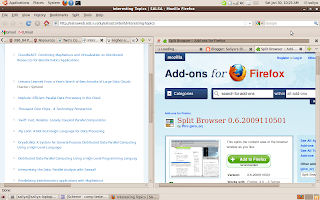
After being able to split the Eclipse windows, I felt the need to split Firefox. Luckily I came across this add-on called "Split Browser", which simply does this for you. It enables you to split tabs both horizontally and vertically. Here's a screenshot of this.

Split View in Eclipse
I really wanted the split view feature to be in Eclipse as with most of the other IDEs. In fact, Eclipse has this feature, but doesn't give a visible menu/tool option to do it. The simplest way is to drag the tab containing the source until you can see an arrow mark. Then it will split the view as soon as you let go of the mouse. Here's a nice video I found on how to do this.
http://addisu.taddese.com/blog/split-windowview-using-eclipse/
Here's a screenshot of how it looks.

http://addisu.taddese.com/blog/split-windowview-using-eclipse/
Here's a screenshot of how it looks.

FireFox Keyboard Shortcuts
Great! Now I can stop using mouse for the most part of browsing.
http://support.mozilla.com/en-US/kb/Keyboard+shortcuts
http://support.mozilla.com/en-US/kb/Keyboard+shortcuts
Internet Speed: Isn't this nice?
In Sri Lanka, I used to connect to Internet using dial-up connection before ADSL came in. Then I felt "wow! ADSL is fast". But today here in IU, I would say "WOW! what a speed". See the picture below to see why I say this.


Windows7: Desktop Icons: CTRL + Wheel
I wanted to change the size of the icons in Windows7 desktop as they were bit larger than I like. The solution was a simple one, though I had to do some Googling to find it out.
Just scroll the mouse wheel while pressing CTRL key. That's easy :). In fact, it can be used in many other places like in windows explorer to change the way how items are showed.
Windows7 and Ubuntu 9.10
I just wiped out my Dell Insipiron E1505 notebook and installed Windows7 Professional and Ubuntu 9.10. I had enough of the Windows XP Media Center Edition. I thought of moving to Ubuntu 9.10 as well, just feel the fun.
Unlike in the previous experience with Windows, the Windows 7 performs really well. Regarding Ubuntu, it's better than 9.04 (I was happy with 9.04 as well). The only funny thing is that I had to find drivers and manually install my ATI Raedon X1300 VGA for Windows7. Earlier I used to do this for Ubuntu installations :)
For the moment, these two OSs seems to be a great combination if you are planning to get the best of both worlds.
Unlike in the previous experience with Windows, the Windows 7 performs really well. Regarding Ubuntu, it's better than 9.04 (I was happy with 9.04 as well). The only funny thing is that I had to find drivers and manually install my ATI Raedon X1300 VGA for Windows7. Earlier I used to do this for Ubuntu installations :)
For the moment, these two OSs seems to be a great combination if you are planning to get the best of both worlds.
Pidgin: Unable to Connect to Yahoo
Pidgin was giving trouble when connecting to my Yahoo account since recently. Today I got to know that it's because of this (http://www.celticwolf.com/useful-information/faqs/26-pidgin-yahoo).
Then I wanted to install a latest version of pidgin on my Ubuntu 9.04. I tried the "how to" given in the official pidgin site (http://www.pidgin.im/download/ubuntu/), but it was unsuccessful. Then I came across these debs (http://linux.softpedia.com/progDownload/Pidgin-Download-6.html) which solved the issue.
Just a quick how-to:
1. Download the i386 (or amd 64) debs
2. Download the two DEB ALL debs
3. Use dpkg -i to install the debs. Start with libpurple-bin_2.6.3-1~getdeb1_all.deb.
Then libpurple0_2.6.3-1~getdeb1_i386.deb (or amd 64 one).
Now move ahead with pidgin-data_2.6.3-1~getdeb1_all.deb.
Next pidgin_2.6.3-1~getdeb1_i386.deb (or amd 64 one)
That's it! no more troubles with Yahoo ;)
Then I wanted to install a latest version of pidgin on my Ubuntu 9.04. I tried the "how to" given in the official pidgin site (http://www.pidgin.im/download/ubuntu/), but it was unsuccessful. Then I came across these debs (http://linux.softpedia.com/progDownload/Pidgin-Download-6.html) which solved the issue.
Just a quick how-to:
1. Download the i386 (or amd 64) debs
2. Download the two DEB ALL debs
3. Use dpkg -i to install the debs. Start with libpurple-bin_2.6.3-1~getdeb1_all.deb.
Then libpurple0_2.6.3-1~getdeb1_i386.deb (or amd 64 one).
Now move ahead with pidgin-data_2.6.3-1~getdeb1_all.deb.
Next pidgin_2.6.3-1~getdeb1_i386.deb (or amd 64 one)
That's it! no more troubles with Yahoo ;)
Subscribe to:
Posts
(
Atom
)


